A client project tracker is a read-only page that shows a client where their project stands without giving them access to your team’s tools: progress, the next milestone, what’s blocked and the launch date. Waypoint builds it from the tasks you already track and keeps it live.
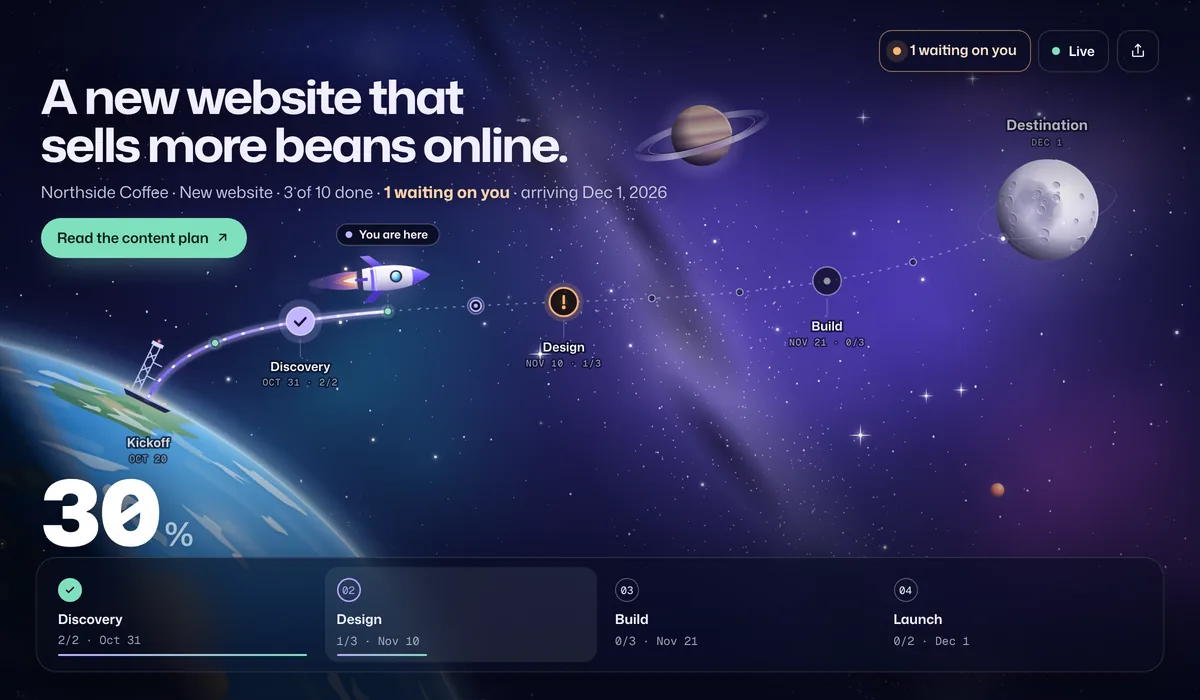
What your clients see
- How far along the project is. Progress counts finished tasks only, so 40% means 40% done, not “nearly there”.
- What’s waiting on them. Mark a task as blocked and waiting on the client (“Approve the homepage design by Friday”), and it sits at the top of their page as their to-do list.
- What changed since they last looked. A short summary on their next visit: stops reached, tasks finished, new requests.
- The launch button. “See the live site” appears at the finish line once everything is done.
- Only what you choose. You decide whether task names and dates are shown. Owners and internal notes are never shown.
An example website project timeline
| Stop | When | What’s in it |
|---|---|---|
| Discovery | Week 1 | Kickoff call, sitemap and content plan |
| Design | Weeks 2–3 | Wireframes, homepage design, design sign-off |
| Build | Weeks 4–5 | Page templates, forms, redirects and SEO |
| Launch | Week 6 | QA on every device, go live |
Design sign-off is the step most likely to slip, so give it a date and mark it as waiting on the client when it is. More examples are in project timeline examples.
Set it up
- Bring the project. Paste a Google Sheets link (Waypoint checks it every 15 minutes), upload an export from Jira, Asana, monday.com, ClickUp or Trello, or start from the website launch template.
- Map your statuses to done, in progress, blocked and not started. Waypoint suggests a mapping from your column.
- Choose what the client sees in Share: stop names, task names, dates and notes for the client.
- Add the launch button with the site’s address, shown when the journey is done.
- Send one link per client. Put it in your kickoff email and your email signature for the project.
Step-by-step guides for each tool are on the integrations page.
Compared with the usual ways
| How you update clients | Good for | Where it falls short |
|---|---|---|
| Weekly status emails | Context and decisions | They take time to write and are out of date by Tuesday |
| Guest seats in your project tool | Clients who want every detail | Internal comments, seat costs and a tool clients don’t know |
| A shared spreadsheet | A quick list of tasks | Hard to read at a glance, and the client copy drifts |
| Waypoint | A live answer to “where are we?” | It’s a view for clients, not where your team does the work |
The guide to sharing project progress with clients compares these in more detail.
Frequently asked questions
Can the client page show our agency’s logo?
Yes. On Pro, every live link and client email shows your logo, name and brand color instead of Waypoint’s, and the client buttons use your color. Set it once in Settings → Your brand. Full white label on your own domain is coming with Agency.
How do I share project progress with clients without a heavy client portal?
Send a read-only live link instead. It shows progress, the next milestone, the launch date and what you need from the client, and it updates from the tasks your team already tracks. Clients don’t need an account.
Can clients see our internal notes or who is assigned?
No. Owners and internal notes never appear on a live link. You choose whether stop names, task names and dates are shown, and you can write a separate one-line note for the client on any task.
Can it show what we’re waiting on from the client?
Yes. Mark a task as blocked and choose that it’s waiting on the client. It appears at the top of the client’s page as “waiting on you”, with your note if you add one.
Does it work with Jira, Asana, monday.com or Google Sheets?
Yes. Google Sheets stays in sync every 15 minutes. For Jira, Asana, monday.com, ClickUp, Trello and others, upload a CSV or Excel export and re-upload to update the same link. Direct sync with more tools is on the way.
How much does it cost for an agency?
Free includes one active journey with a live link and email updates for clients. Starter is $9 a month or $72 a year for up to 5 journeys, Pro is $29 a month or $228 a year for unlimited journeys, 3 editors and your logo and brand color on live links and client emails, and Agency is $99 a month or $828 a year for up to 20 editors. Every account starts with 14 days of Pro, no card needed. Clients who open a live link never count as editors.