A PR campaign tracker shows a client the stages of their campaign, what’s finished and what’s next, along with anything the agency needs from them, such as approvals, quotes or photos. Waypoint keeps it on one live link, so the weekly recap becomes a quick look.
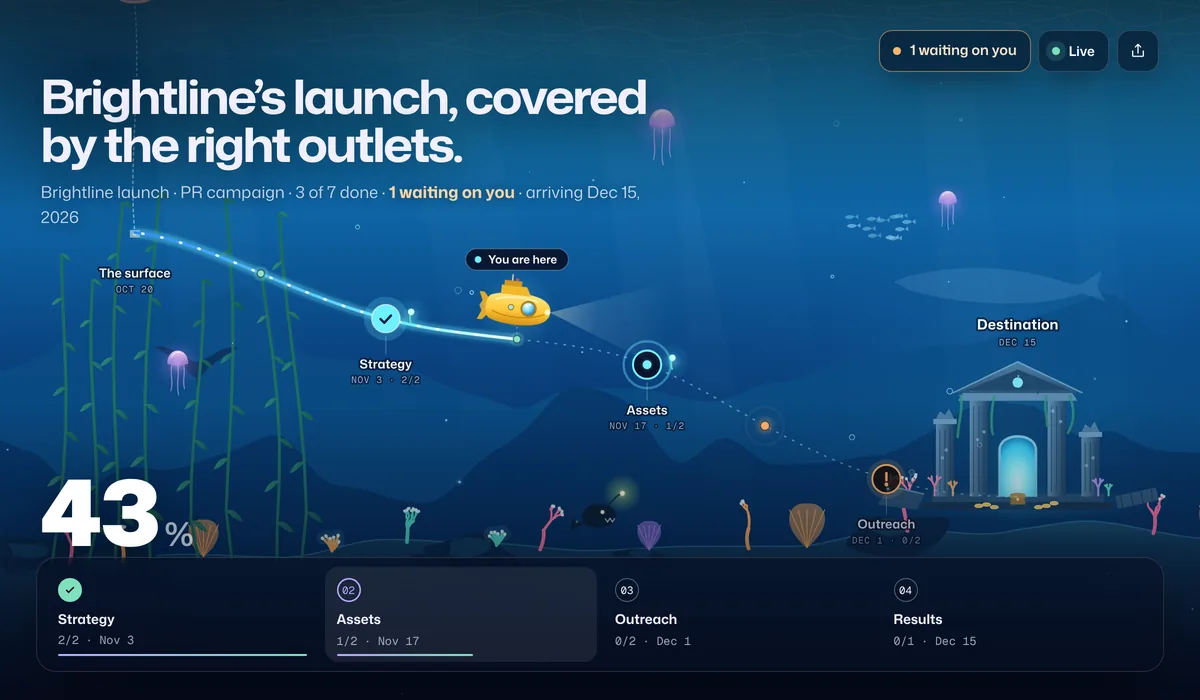
What your clients see
- Where the campaign is. Each stage as a stop, from strategy to results, with progress counted from finished work.
- The approvals you need. A press release to sign off or photos to pick, shown at the top as “waiting on you” with your note.
- What happened since their last visit. Pitches sent, interviews booked, stages reached.
- The results. A “Read the coverage report” button at the finish line, or on the Results stop.
An example campaign timeline
| Stop | When | What’s in it |
|---|---|---|
| Strategy | Weeks 1–2 | Messaging and angles, media list |
| Assets | Weeks 3–4 | Press release approved, media kit and photos |
| Outreach | Weeks 5–7 | Pitches out, interviews booked, follow-ups |
| Results | Week 8 | Coverage report |
Put the report on the timeline from the start. Campaigns whose plan ends at “launch” rarely get measured.
Set it up
- Start from the PR campaign template or the marketing campaign template, or bring your plan from a Google Sheet.
- Rename it for the client and campaign, and set the dates you agreed.
- Mark approvals as waiting on the client when you send them, with a one-line note: “Approve the final press release”.
- Add the report as the finish-line button when the campaign wraps up.
- Share one link per campaign. A client with several campaigns gets one journey for each.
Compared with the usual ways
| How you update clients | Good for | Where it falls short |
|---|---|---|
| Weekly recap emails | Commentary and wins | Time-consuming, and approvals get lost in the thread |
| A shared tracker sheet | Media lists and pitch tracking | Too detailed for the client to read at a glance |
| Status calls | Discussion and decisions | Hard to schedule, and the status is stale by the next one |
| Waypoint | A live view of the plan and what you need from the client | It doesn’t send pitches or track coverage itself |
Frequently asked questions
How do I report PR campaign progress to clients?
Keep the plan as stages (strategy, assets, outreach, results) and share it as a live link. The client sees progress, upcoming dates and any approvals you need, and you keep your recap emails for commentary rather than status.
Can clients approve things from the live link?
Not yet. The live link shows what you’re waiting on, with your note, and clients reply the way they do today. When you get the approval, mark the task done and the page updates.
Can I share the coverage report at the end?
Yes. Add a finish-line button with the report’s link. Set it to appear when the journey is done, or right away if the report is a live dashboard.
Can one client have several campaigns?
Yes. Each campaign is its own journey with its own link. Starter includes 5 active journeys and Pro is unlimited.
How much does it cost?
Free includes one active journey with a live link and email updates for clients. Starter is $9 a month or $72 a year for up to 5 journeys, Pro is $29 a month or $228 a year for unlimited journeys, 3 editors and your logo and brand color on live links and client emails, and Agency is $99 a month or $828 a year for up to 20 editors. Every account starts with 14 days of Pro, no card needed. Clients who open a live link never count as editors.