A gallery delivery tracker is a page your client can open at any time to see where their photos, film or design files are: what’s done, what you’re working on and when the finished work will be ready. With Waypoint it’s a live link that updates as you tick off each step, so nobody has to email to ask.
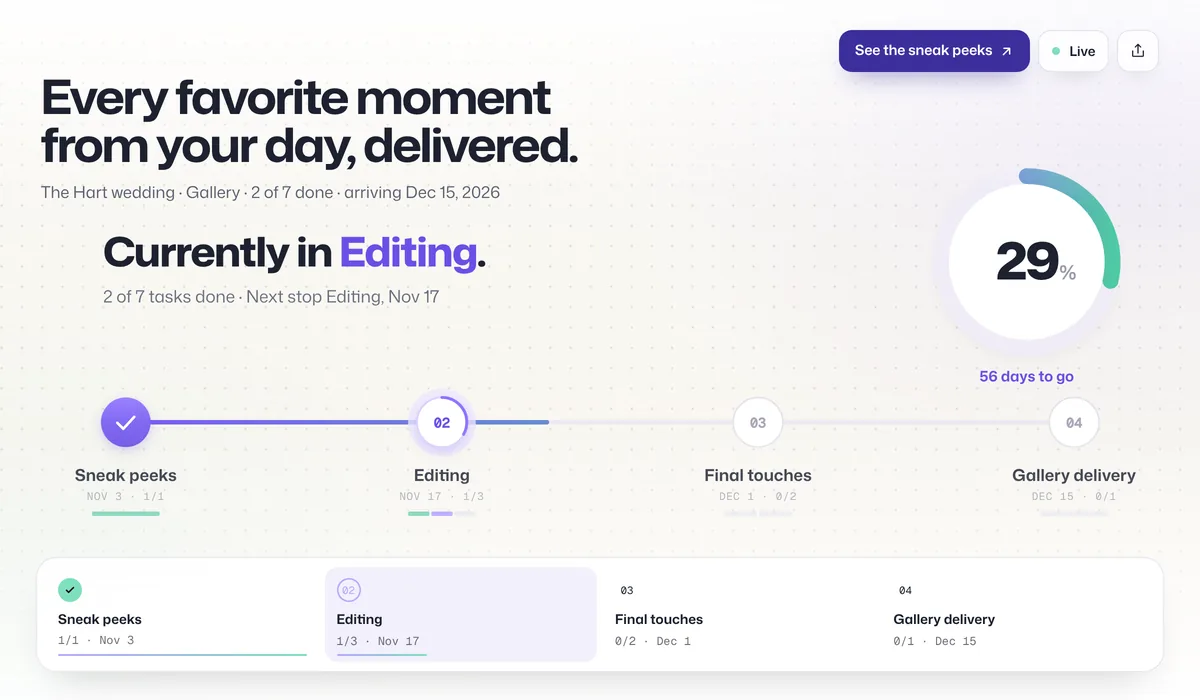
What your clients see
- Where their gallery is. A progress ring and a short list of stops: sneak peeks, editing, final touches, delivery.
- The date it’s due. Each stop can have a target date, and the page counts down to delivery.
- Anything you need from them. Mark a step as waiting on the client (“Pick 20 favorites for the album”) and it shows at the top of their page.
- A button at the finish line. “View your gallery” appears the moment the last step is done. The gallery address isn’t sent to their browser before that.
- Nothing internal. Your notes and who on your team is doing what never appear on the client’s page.
The page works in any browser and is built for phones first, since that’s where most clients will open it. There’s no account and no app to install.
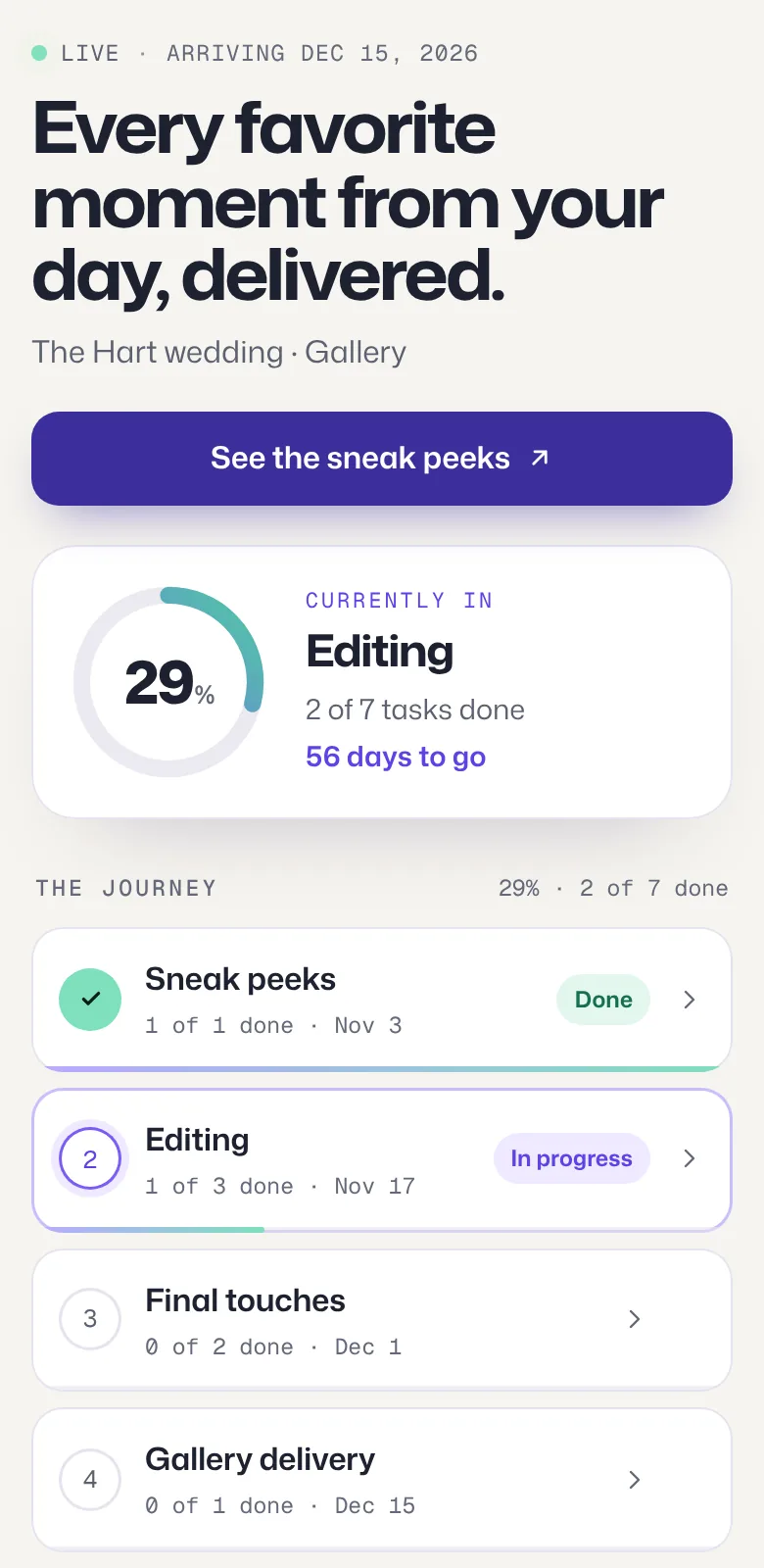
An example wedding gallery timeline
Every studio works to its own turnaround, and you set your own dates. This is the shape of the starter template, spread over eight weeks:
| Stop | When | What’s in it |
|---|---|---|
| Sneak peeks | Days after the event | A handful of favorites to share while the full set is edited |
| Editing | Weeks 1–6 | Culling the full set, color and editing, retouching the favorites |
| Final touches | Week 7 | A last review and preparing the gallery |
| Gallery delivery | Week 8 | The finished gallery, with the button to open it |
Put the turnaround you promise in your contract into the journey’s target date. Clients see the same date you agreed, and the countdown does the reminding.
Set it up in five minutes
- Start from the template. Open the photo and video delivery template below, or pick it under New journey → Start fresh.
- Name it for the client, for example “The Hart wedding · Gallery”, and set the delivery date.
- Add the finish-line button. Paste your gallery link (from Pixieset, Pic-Time, ShootProof, SmugMug, Dropbox or anywhere else) and label it “View your gallery”. Leave it on When the journey is done.
- Add a button to a stop if you like, such as “See the sneak peeks” on the first stop.
- Send the live link with your booking confirmation or your thank-you email, then tick off steps as you go.
For your next client, use Duplicate on the journey. The copy keeps your stops and steps and starts without the last client’s buttons, so no one ever sees someone else’s gallery.
Buttons worth adding
- View your gallery
- See the sneak peeks
- Watch the highlight film
- Choose your album photos
- Download the final files
- Book your next session
Compared with the usual ways
| How you update clients | Good for | Where it falls short |
|---|---|---|
| Email updates | A personal touch at key moments | Clients still ask in between, and the thread gets long |
| A note in your contract | Setting the turnaround up front | Nobody rereads a contract to check progress |
| Studio software client portals | Contracts, invoices and questionnaires | Usually a login, and progress on the edit is rarely the focus |
| Waypoint | One link per client that shows where their gallery is | It shows progress; your gallery still lives where it does today |
Video and design work follows the same pattern: swap the stops for rough cut, revisions and final export, or concepts, revisions and final files. The agency page has a brand and web example.
Frequently asked questions
How do I keep wedding clients updated while I edit their gallery?
Give each couple one live link at booking or right after the wedding. It shows where their gallery is (sneak peeks, editing, final touches, delivery), the date it’s due and anything you need from them. You update it by ticking off steps, so you’re not writing update emails.
Can the button link to my gallery on Pixieset, Pic-Time or ShootProof?
Yes. A button can point to any web address, so it works with any gallery host or a Dropbox or Google Drive folder. Waypoint doesn’t store your photos. With When the journey is done, the address isn’t sent to the client’s browser until every step is finished.
Do couples need an account or an app?
No. The live link opens in any browser on a phone or computer, and the people viewing it never need to sign up.
Does it work for videographers and designers?
Yes. Start from the photo and video delivery template or the brand and design template and rename the stops to match how you work: rough cut, revisions and final export, or concepts, revisions and final files.
How much does it cost?
Free includes one active journey with a live link and email updates for clients. Starter is $9 a month or $72 a year for up to 5 journeys, Pro is $29 a month or $228 a year for unlimited journeys, 3 editors and your logo and brand color on live links and client emails, and Agency is $99 a month or $828 a year for up to 20 editors. Every account starts with 14 days of Pro, no card needed. Clients who open a live link never count as editors.