Short answer: Jira’s roadmap is now called Timeline, a Gantt-style view in every software space. Plans (formerly Advanced Roadmaps) adds roadmaps across several spaces on Premium and Enterprise. Clients can see these only as guests or through a public dashboard, which puts them inside Jira. To show clients a simple visual roadmap, export your work items to CSV and share them as a live Waypoint link they open without an account.
Jira’s roadmap, timeline and Gantt views
Since late 2025 Jira calls projects spaces and issues work items. The views people look for when they search for a Jira roadmap or Gantt chart are these:
| View | What it shows | Jira plans |
|---|---|---|
| Timeline | Epics and their work items as bars over time, with dependencies, inside one software space | All plans |
| Plans (formerly Advanced Roadmaps) | Roadmaps across several spaces and teams, with timeline, list, calendar and dependency views | Premium and Enterprise |
| Dashboards | Gadgets such as filter results, charts and progress, arranged on one page | All plans |
There’s no view called “Gantt chart” in Jira. Atlassian describes Timeline and Plans as Gantt-chart-like, and they’re what most people mean by a Jira Gantt chart.
How to open the Jira timeline
- Open a software space and select Timeline in the sidebar.
- Create epics for the big chunks of work, then drag each bar to set its start and due dates.
- Add work items under each epic so the bars show progress as they’re done.
Sharing a Jira roadmap with clients
| Option | Client needs an account | Uses a paid seat | What the client sees |
|---|---|---|---|
| Guest access (Standard and up) | Yes, an Atlassian account | No, up to 5 guests per paid user | One space: its work items and comments, and they can create and edit there. Not dashboards or Plans. |
| Public dashboard | No | No | Whatever the dashboard’s gadgets show. A site admin has to turn on public sharing first (Standard and up). |
| Timeline screenshot | No | No | A picture of the timeline that’s out of date as soon as it’s sent |
| Live Waypoint link | No | No | Progress, stops and blockers, with task names and dates only if you choose |
Jira Service Management’s customer portal is free for customers, but it’s for requests and tickets, not for showing project progress.
Why Jira views are hard for clients
- It speaks the team’s language. Sprints, story points, work item keys and statuses like “In review” mean something to your team and very little to a client.
- Guests are inside your space. They see work in progress and comments meant for teammates, and can edit unless you lock permissions down.
- Public dashboards are all or nothing. They show whatever the filter returns, and turning on public sharing is a site-wide setting.
What clients want from a roadmap is simpler: how far along it is, what’s next, what’s stuck and when it lands.
Turn a Jira space into a live client roadmap
- Export from Jira. Go to Filters → Search work items and filter to your space (or one epic or release). Click ••• (More actions) → Export → Export Excel CSV (current fields). Include Summary, Status, Due date and Parent summary (the epic). Jira exports up to 10,000 work items at a time.
- Upload it to Waypoint. Start a journey, choose Upload a file and drop in the export. Waypoint finds the task, status, due date and owner columns, suggests the epic (Parent summary) or sprint for the stops along the route, and maps statuses like “To Do”, “In Progress” and “Done” to four states: not started, in progress, blocked and done. A live preview updates as you adjust.
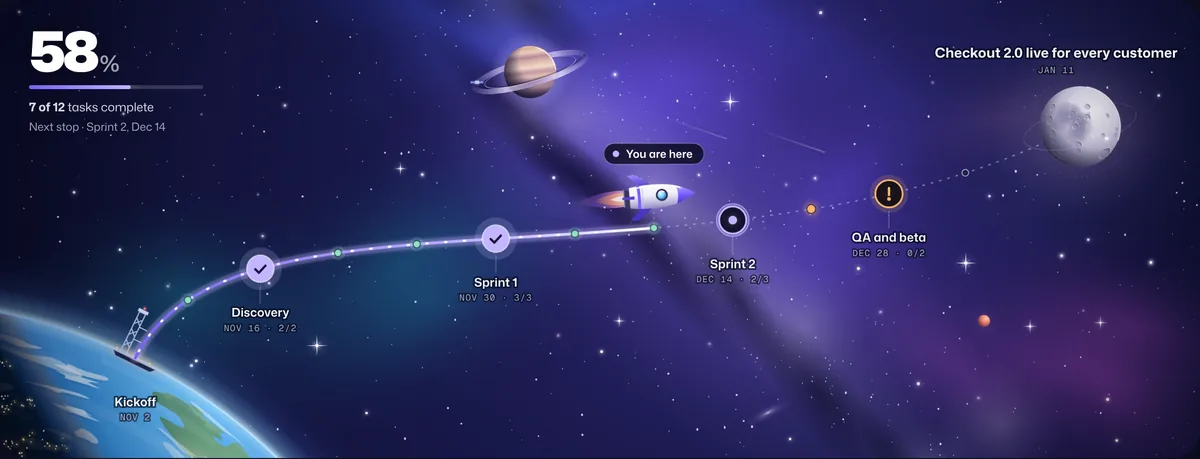
- Name the destination. The outcome your client cares about, like “Checkout 2.0 live for every customer”, and the target date.
- Choose what clients see, then share the link. Stop names, task names and dates are each on or off. Owners and internal notes are never shown. Clients open the link in any browser, with no account, and tap a stop to see its tasks.
- Keep it current. Upload a fresh export to the same journey (journey settings → Change source or columns); Waypoint remembers your columns and the link stays the same. Direct Jira sync is on the way.
Frequently asked questions
Does Jira have a Gantt chart?
Not by that name. Timeline, in every software space, shows epics and work items as bars with dependencies, and Plans (Premium and Enterprise) adds roadmaps across teams. Both work much like a Gantt chart.
What happened to roadmaps in Jira?
Atlassian renamed the roadmap in software spaces to Timeline, and Advanced Roadmaps to Plans. Projects are now called spaces and issues are called work items.
Can clients see a Jira dashboard without an account?
Only if a site admin turns on public sharing (Standard plan and up) and the dashboard is shared publicly. Jira guests can’t open dashboards.
How many free guests can I add in Jira?
As of April 2026, Standard, Premium and Enterprise sites can add up to five guests for each paid user at no cost. Each guest gets access to one space.
Can Waypoint sync with Jira automatically?
Not yet. Today you import a CSV export and re-import it to update the same journey and link. Direct Jira sync is on the way.