A project status report is a short, regular update that tells stakeholders how a project is doing against its plan: the overall status, progress since the last report, what’s coming next, blockers and decisions needed, and risks to the finish date. A good one fits on one screen and leads with the answer.
The template
Copy this into an email, a doc or your team chat. Replace everything in square brackets. Keep the section order: readers who only scan the first two lines still get the answer.
PROJECT STATUS REPORT
Project: [Project name]
Reporting period: [Start date] to [End date]
Prepared by: [Name]  ·  Next update: [Date]

OVERALL STATUS: [On track / At risk / Off track]
In one sentence: [The single most important thing the reader needs to know.]

PROGRESS
Complete: [X] of [Y] tasks ([Z]%)
Current milestone: [Milestone], due [date]
Target finish: [Date] ([on schedule / N days behind / N days ahead])

MILESTONES
[Milestone 1]  ·  [Date]  ·  [Done / In progress / Not started]
[Milestone 2]  ·  [Date]  ·  [Done / In progress / Not started]
[Milestone 3]  ·  [Date]  ·  [Done / In progress / Not started]

DONE THIS PERIOD
- [An outcome, not an activity]
- [An outcome, not an activity]

COMING NEXT
- [What will be finished, and when]
- [What will be finished, and when]

BLOCKERS AND DECISIONS NEEDED
- [What is blocked]  ·  needs [person] by [date]

RISKS
- [Risk]  ·  likelihood [low / medium / high]  ·  what we're doing about it

LINKS
Live progress: [link]  ·  Project files: [link]
A filled-in example
Here’s the same template for a six-week website relaunch, in week three. Notice that the status is At risk even though most work is moving: one blocker threatens a milestone, so the report says so in the first line and names who can clear it.
PROJECT STATUS REPORT
Project: Studio website relaunch
Reporting period: Nov 16 to Nov 20, 2026
Prepared by: Alex Rivera  ·  Next update: Nov 27

OVERALL STATUS: At risk
In one sentence: Design is almost signed off, but the lead forms are blocked until we get CRM access; with access by Nov 28 we still launch on Dec 18.

PROGRESS
Complete: 5 of 15 tasks (33%)
Current milestone: Design, due Nov 23
Target finish: Dec 18 (on schedule if the blocker clears by Nov 28)

MILESTONES
Discovery  ·  Nov 9  ·  Done
Design  ·  Nov 23  ·  In progress (2 of 4 done)
Build  ·  Dec 7  ·  Not started
Content and QA  ·  Dec 16  ·  Not started
Launch  ·  Dec 18  ·  Not started

DONE THIS PERIOD
- Wireframes approved for all key pages
- Homepage design delivered for the second round of feedback

COMING NEXT
- Inner page designs (Nov 20)
- Design sign-off meeting (Nov 23)

BLOCKERS AND DECISIONS NEEDED
- Lead forms can't be connected to the CRM  ·  needs admin access from Dana by Nov 28

RISKS
- Content arrives late  ·  likelihood medium  ·  we're sending the content checklist this week

LINKS
Live progress: codified.dev/waypoint/...  ·  Project files: shared drive
How to write a status report people read
- Lead with the answer. The overall status and one sentence come first. Everything else is supporting detail for people who want it.
- Agree what the status words mean before the project starts. For example: On track means every milestone will land on its date; At risk means a milestone will slip unless something changes; Off track means the finish date has moved. Then use them the same way every time.
- Count progress from finished work only. “70% done” on a half-built page invites arguments. Percent complete should be finished tasks divided by all tasks, so the number only moves when something is actually done.
- Write outcomes, not activity. “Homepage design approved” tells the reader something changed. “Worked on the homepage” doesn’t.
- Name the blocker, the person who can clear it and the date you need it. A blocker without an owner and a deadline is just a complaint.
- Same day, same format. When the report arrives every Friday in the same shape, people learn where to look and stop asking for ad-hoc updates.
- Keep it to one screen and link to the rest. Detail belongs in the project tool. The report is the summary.
On track, at risk, off track: what they mean
| Status | Means | What the report should include |
|---|---|---|
| On track | Every milestone will land on its date. | Progress, what’s next. Keep it short. |
| At risk | A milestone will slip unless something changes. | The cause, who can fix it, by when, and the impact if they don’t. |
| Off track | The finish date has moved. | The new date, why, and what you need decided. Send it the day it happens, not on report day. |
Weekly or monthly?
For client projects and anything under about three months, weekly works best: things change fast enough that a monthly report arrives after the decisions it should have prompted. For longer programs, every two weeks or monthly is usually enough, with an extra update whenever the status changes to at risk or off track. Whatever you choose, put it in the kickoff plan so stakeholders know when to expect it.
Skip the weekly write‑up with a live status page
Most of a status report is copied from somewhere else: the percent complete, the milestone dates, the list of what finished. If your tasks already live in a spreadsheet or a project tool, that part can update itself.
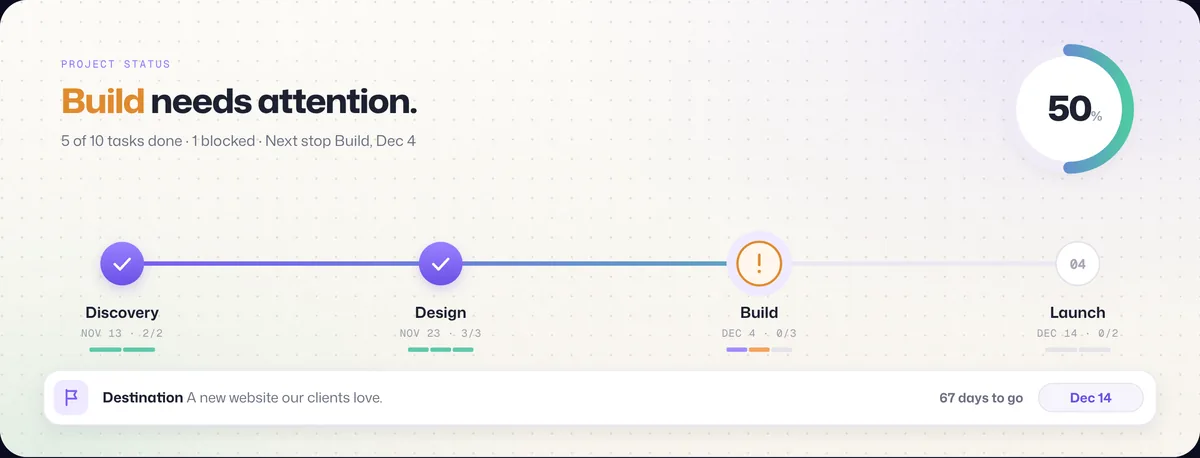
Waypoint reads your tasks from Google Sheets, an Excel or CSV file, or an export from monday.com, Jira, Asana and other tools, and shows them as a live journey: percent complete from finished tasks, the current milestone, blockers and the destination date. You share one link. Clients open it without an account, and it updates as tasks move. You still write a short note when something needs a decision; you just stop retyping the numbers.
Frequently asked questions
What should a project status report include?
The overall status (on track, at risk or off track), a one-sentence summary, progress since the last report, the current milestone and target date, what’s coming next, blockers with the person who can clear them, and risks to the finish date. Add links to the live progress view and the project files.
How long should a project status report be?
One screen. Lead with the status and one sentence, then the supporting detail. If it needs more than a page, the detail belongs in the project tool and the report should link to it.
How often should you send a project status report?
Weekly for client projects and anything shorter than about three months; every two weeks or monthly for long programs. Send an extra update the moment the status changes to at risk or off track.
What is the difference between a status report and a progress report?
A progress report describes the work done in a period. A status report compares the project with its plan and says whether it will land on time, what’s blocking it and what needs deciding. Most teams combine both in one weekly status report.
Is there a free project status report template?
Yes. The template on this page is free to copy into email, Google Docs, Word or Slack. If your tasks are in a spreadsheet or project tool, Waypoint can also turn them into a live status page you share as a link, free to start.