A good reschedule message says who it’s from, the service, the old time, the new time, why it moved, and what to do if the new time doesn’t work, in under 160 characters for a text. Below are templates for a visit moved later or earlier, skipped, added, a technician change, a weather delay, a holiday week and the last visit of the season. Replace the [brackets] and send.
What every reschedule message needs
- Who you are, in the first words, so it isn’t mistaken for spam.
- The service and the site, for customers with several locations.
- The old time and the new time, with the day and date.
- Why, in a few words. People accept changes they understand.
- What to do if it doesn’t work: reply, call, or confirm with one letter.
Keep texts under 160 characters where you can, so they arrive as one message. Only text customers who agreed to receive texts, and include a way to opt out in your first message.
Visit moved later
Same day, later time
Text
[Company]: your [service] at [site] on [Tue Oct 13] moved from [7:15] to [8:05 AM], still in your [7–10 AM] window. Reply C to confirm or call [phone].
Email: Your [service] on [Tue, Oct 13] is now at [8:05 AM]
Hi [name], your [service] at [site] on [Tuesday, October 13] has moved from [7:15 AM] to [8:05 AM], still within your [7–10 AM] window. [Reason: another visit on the route ran long.] If that doesn’t work, reply to this email or call [phone] and we’ll find another time. Thank you, [your name], [company]
Visit moved earlier
Same day, earlier time
Text
[Company]: we can reach [site] earlier on [Wed Oct 14], at [6:25 AM] instead of [9:40]. Reply C to confirm or N to keep [9:40].
Email: Earlier time for your [service] on [Wed, Oct 14]
Hi [name], we can reach [site] earlier on [Wednesday, October 14]: [6:25 AM] instead of [9:40 AM], inside your [5:30–9 AM] window. Reply “yes” to confirm, or let us know if you’d rather keep [9:40]. Thanks, [company]
Visit moved to another day
New day
Text
[Company]: your [service] moves from [Thu Oct 15] to [Fri Oct 16], [9–11 AM], because [a technician is out]. Reply C to confirm or call [phone].
Email: New date for your [service]: [Fri, Oct 16]
Hi [name], we need to move your [service] at [site] from [Thursday, October 15] to [Friday, October 16], arriving [9–11 AM], because [one of our technicians is out]. Your next regular visit stays on [date]. If Friday doesn’t work, reply or call [phone]. Sorry for the change, [company]
Visit skipped
Skip confirmed
Text
[Company]: as requested, we’ll skip your [service] on [Thu Oct 15]. Next visit: [Thu Oct 29]. Reply or call [phone] with questions.
Email: Skipping your [service] on [Thu, Oct 15]
Hi [name], as you asked, we’ll skip the [service] at [site] on [Thursday, October 15]. Your next visit is [Thursday, October 29], at the usual time. Thanks, [company]
Visit added
Extra visit
Text
[Company]: we’ve added a [service] at [site] on [Mon Oct 19], [7–9 AM]. Reply C to confirm or call [phone].
Email: Extra [service] visit on [Mon, Oct 19]
Hi [name], we’ve scheduled an extra [service] at [site] on [Monday, October 19], arriving [7–9 AM], [as discussed / to follow up on last visit]. Reply to confirm or let us know if another time is better. [company]
Different technician
Technician change
Text
[Company]: [Dana] will handle your [service] on [Tue Oct 13] instead of [Marcus]. Same time, [8:05 AM]. Questions? [phone]
Email: A different technician on [Tue, Oct 13]
Hi [name], [Dana Ruiz] will handle your [service] on [Tuesday, October 13] at the usual time, [8:05 AM], while [Marcus] is out. [Dana] has your access notes. Questions? Reply or call [phone]. [company]
Weather delay
Weather
Text
[Company]: rain today, so your [service] moves to [Wed Oct 14], [8–10 AM]. Reply C to confirm or call [phone].
Email: Weather: your [service] moves to [Wed, Oct 14]
Hi [name], because of [heavy rain] today we’re moving your [service] at [site] to [Wednesday, October 14], arriving [8–10 AM]. Your regular schedule continues after that. Thanks for understanding, [company]
Holiday week and end of season
Holiday schedule
Text
[Company]: no service on [Thu Nov 26] for the holiday. Your visit moves to [Wed Nov 25], [usual time]. Reply or call [phone].
Email: Holiday schedule: your [service] moves to [Wed, Nov 25]
Hi [name], we’re closed [Thursday, November 26], so your [service] moves to [Wednesday, November 25] at the usual time. Your next visit is back on [Thursday, December 10]. Happy holidays, [company]
Last visit of the season
Text
[Company]: your last [service] of the season is [Fri Oct 30]. We’ll be back the week of [Apr 5]. Thanks!
Email: Your last [service] of the season: [Fri, Oct 30]
Hi [name], your last [service] of the season at [site] is [Friday, October 30]. We’ll restart the week of [April 5] unless you tell us otherwise. Thanks for a great season, [company]
Know who to tell, every week
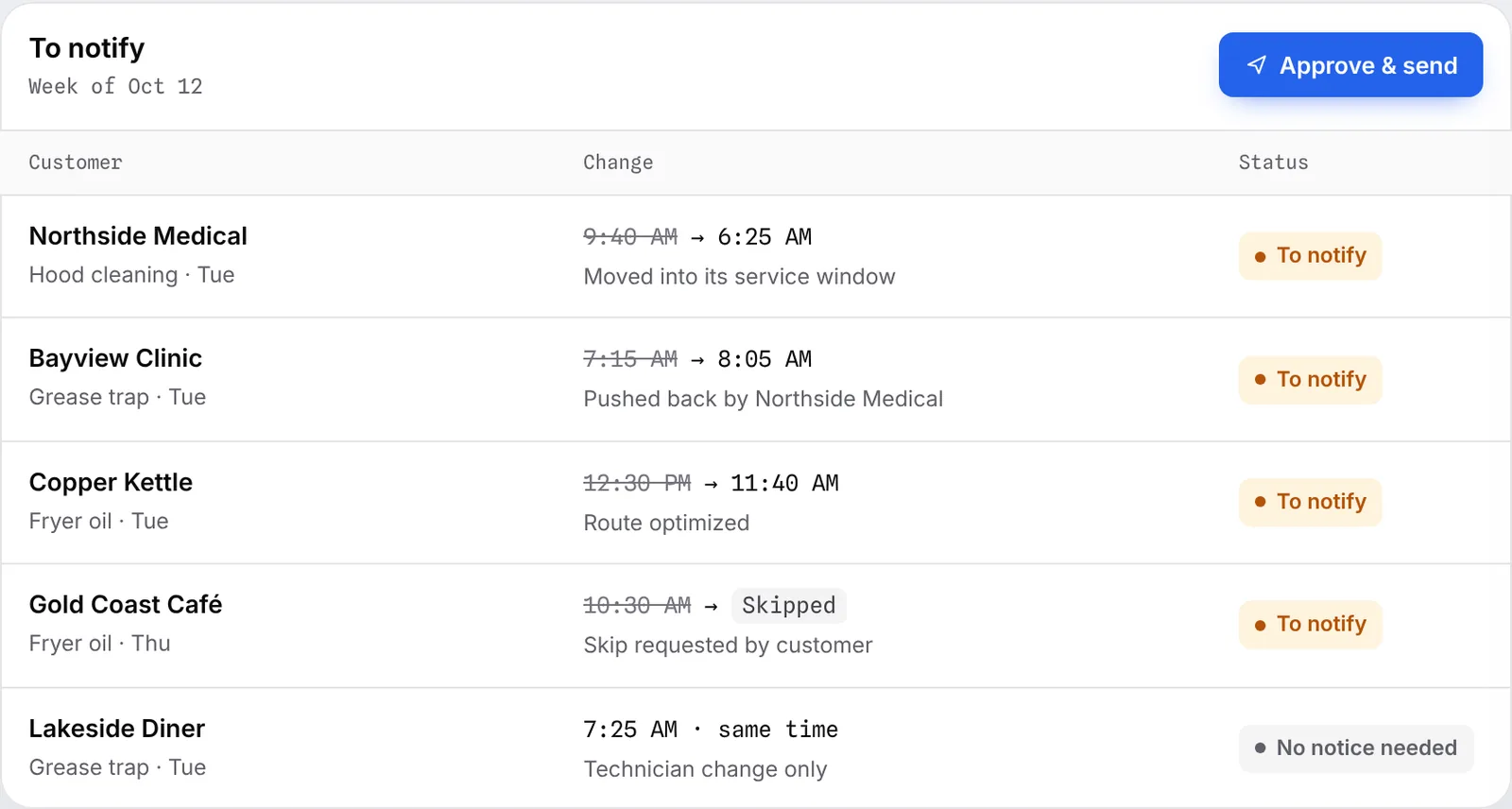
The hard part isn’t writing the message; it’s knowing every customer whose visit moved. In Crewtide, every change lands on a To notify list with the old time, the new time and the reason, so nobody gets missed. Sending these messages by text and email from that list is coming with Pro.
Questions
How do you write a reschedule text message?
Start with your company name, then the service, the old and new time with the day, a short reason, and how to reply. Keep it under 160 characters.
Should I text or email customers about schedule changes?
Text for same-day and next-day changes, email for changes further out or when you need more detail. Ask each customer which they prefer, and only text people who agreed to texts.
How do I confirm a new appointment time by text?
Ask for a one-letter reply, such as “Reply C to confirm”, and give a phone number for anything else.
Can Crewtide send these messages?
Crewtide lists every customer whose visit moved today. Sending texts and emails from that list is coming with Crewtide Pro.