Recurring route planning means deciding, every week, which recurring customers are due, which technician serves each one, on which day and in what order, so every visit fits its service window and nobody drives more than necessary. The reliable way to do it: keep one master customer list with each customer’s cycle, usual days, window and time on site; generate the week from it; place visits on routes with real drive times; fix conflicts before publishing; and record every change with a reason and a list of who to tell.
Recurring routes vs everyday dispatch
Dispatch answers “who can take this job today?”. Recurring route planning answers a harder question once a week: how do hundreds of customers who each repeat on their own cycle fit onto a handful of routes, inside their windows, without anyone running past clock-out? The same customers come back every week, every two weeks or every month, so the work is mostly about getting the pattern right and protecting it when things change.
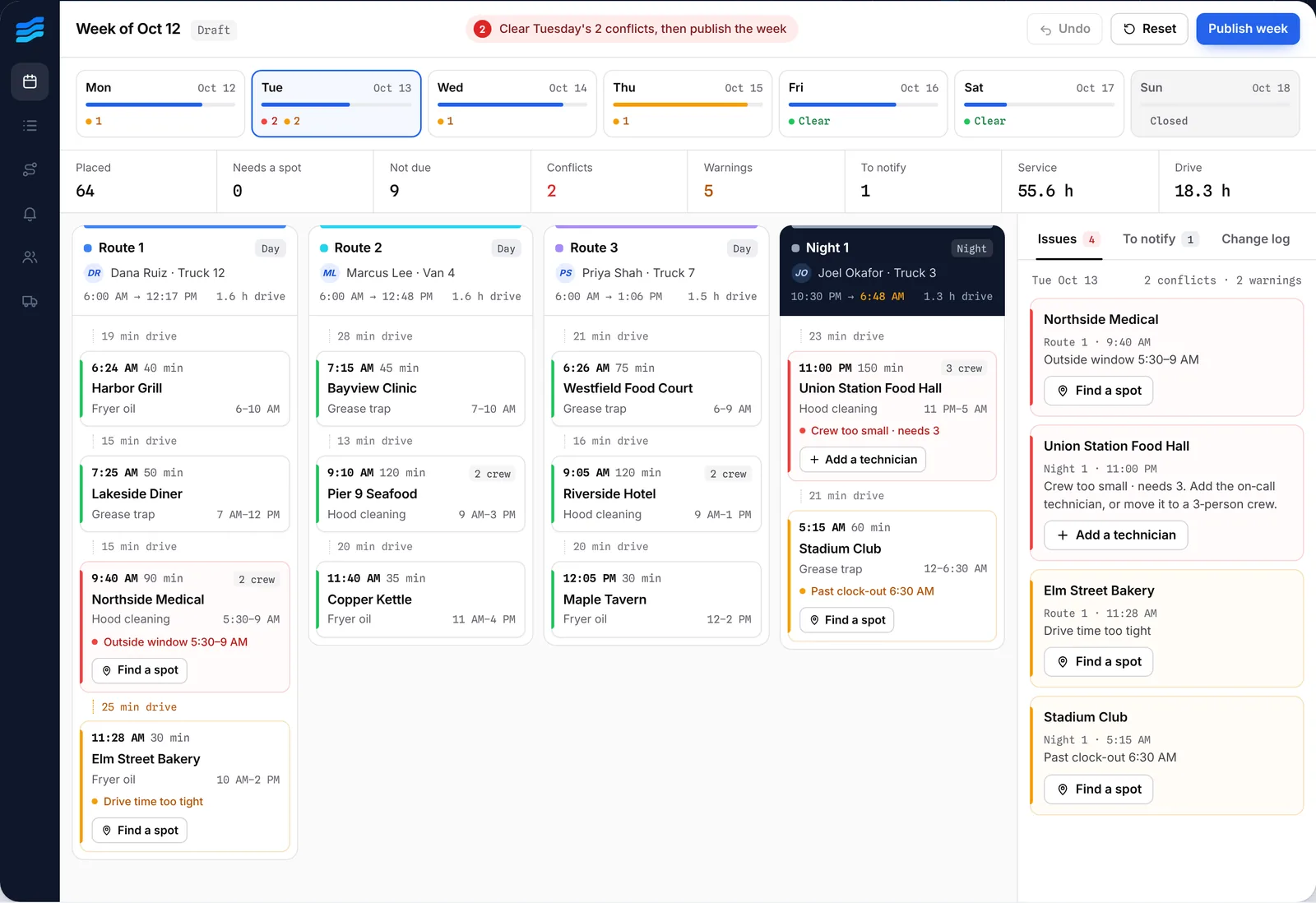
Step 1: Keep one master customer list
Stop copying last week’s sheet. Keep one list with a row per recurring service, and plan every week from it. Each row needs:
| Field | Why it matters | Example |
|---|---|---|
| Service address | Drive times and route density | 412 Front St |
| Visit cycle | Which weeks the customer is due | Every 2 weeks |
| First due date | Anchors every-other-week and monthly cycles | Nov 2, 2026 |
| Usual days | Customers expect the same day | Tue or Wed |
| Service window and no-go times | When you’re allowed on site | 5:30–9:00 AM; not Fridays |
| Time on site by crew size | How long the stop really takes | 1 tech 150 min, 2 crew 90 min |
| Usual technician | Continuity and certifications | Marcus Lee |
| Contact | Who to tell when the visit moves | Facilities desk, phone, email |
The free recurring service schedule template has every column, eight example customers and a tab that shows who’s due in any week.
Step 2: Get the cycles right
Weekly customers are easy. Every-other-week, every-four-weeks and monthly customers are where schedules drift. Anchor each cycle to a first due date, not to “whatever we did last time”, and decide whether monthly means a date (the 10th) or a weekday (the second Tuesday). Our guide to biweekly and monthly service schedules covers the method and the formulas.
Step 3: Generate the week, then place it on routes
List every visit that’s due next week, including seasonal customers starting or ending and one-offs. Then place them on routes. A good placement:
- keeps each visit inside its window and off its no-go times;
- keeps usual days and usual technicians where it can;
- groups nearby stops so each route stays dense;
- uses real road drive times, not straight-line distance;
- matches crew size to the job and ends each shift on time, including night routes that cross midnight.
This is the part route optimization does well. In Crewtide, building the week places every due visit on a route with route optimization and lists anything it couldn’t place, with the reason. More on how it works: route optimization for field service.
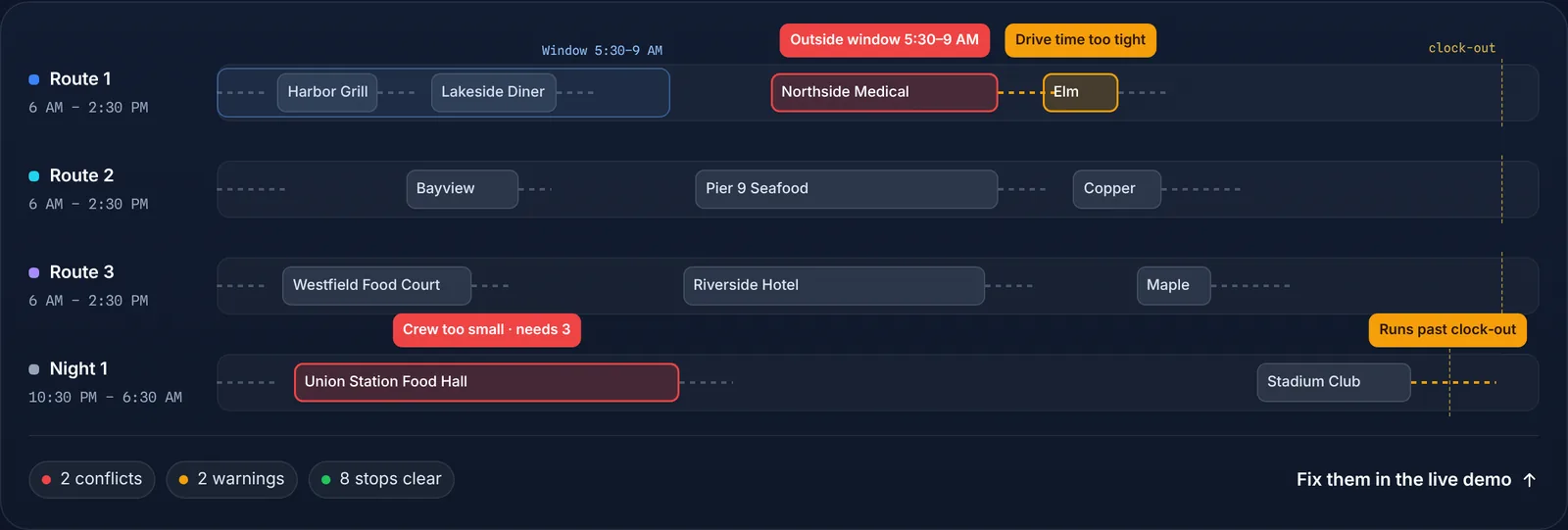
Step 4: Check for conflicts before anyone drives
Run through the week looking for the problems crews would otherwise find for you:
- a visit outside its service window;
- a two-person job on a one-person route;
- a technician scheduled during time off, or a van that’s in the shop;
- a drive between stops that’s too tight;
- a route that runs past clock-out;
- a customer who’s due but not on any route.
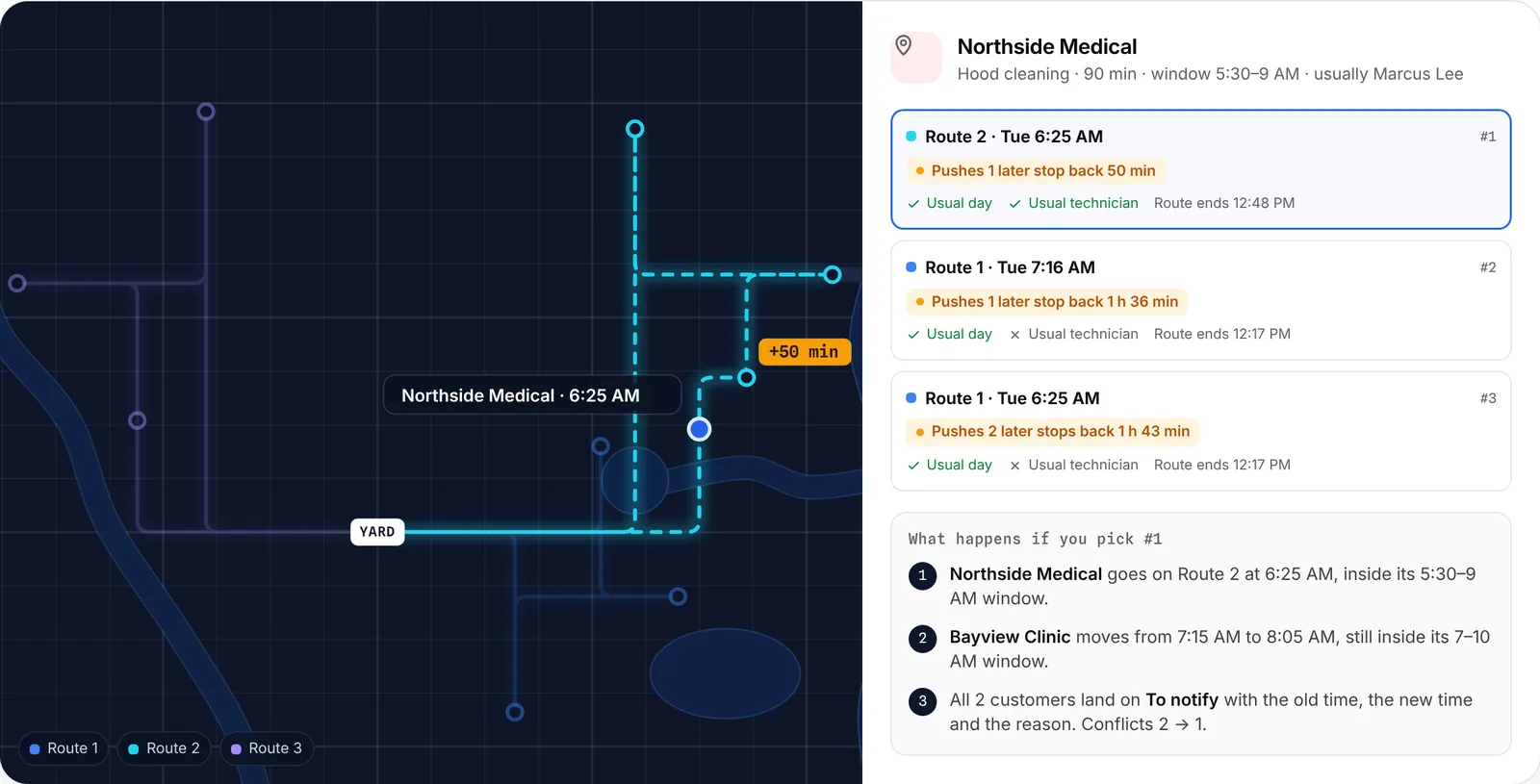
Step 5: Handle changes without starting over
Most of the week’s work is changes: a customer asks for Thursday, a technician calls out, a new account starts. Before you move anything, ask what it will push back or bump. Then record why you moved it and add the customer to a list of people to tell.
When a technician is out, follow the call-off plan; when customers need to hear about a change, use the reschedule message templates.
Step 6: Publish and close the loop
- Publish the week.Freeze a version your team works from, and print or export route sheets.
- Tell the customers whose visit moved.Old time, new time and the reason, by call, text or email.
- Update the system of record.Re-enter changes in your billing or field service software from the change list.
- Roll forward.Next week starts from the master list again, not from this week’s exceptions.
A weekly planning checklist
- Master list updated with new, cancelled and changed customers
- Time off, holidays, closures and equipment out of service entered
- Next week generated from the list, seasonal starts and ends included
- Visits placed on routes with real drive times
- All red conflicts fixed, amber ones reviewed
- Week published and route sheets out
- Customers whose visit moved told, with the reason
- Changes entered in the system of record
If this takes your scheduler most of a day, the route planning cost calculator shows what it’s costing and what software would save.
Questions
What is recurring route planning?
Recurring route planning is deciding each week which recurring customers are due, which technician serves each one, on which day and in what order, so every visit fits its window and routes stay short.
How far ahead should I plan recurring routes?
Most recurring service teams plan one week at a time, published a few days ahead, and generate it from a master list so future weeks are always one step away.
Can I plan recurring routes in a spreadsheet?
Yes, for a small team. It gets slow and error-prone when cycles, windows and crews interact across many technicians. See planning routes in a spreadsheet vs software.
What software plans recurring service routes?
Route planners optimize a day of stops; field service suites schedule jobs and invoices. Crewtide is built for the weekly recurring plan itself, with route optimization, windows, crews and a change log.
What’s the difference between scheduling and routing?
Scheduling decides which day and technician a visit gets; routing decides the order of stops and the drive between them. Recurring planning needs both at once.