When a technician calls out: list their stops for the day, sort them by how fixed they are (narrow windows and must-do services first), cover those by adding them to nearby routes or sending a backup, move the flexible ones to another day this week inside their windows, and tell every affected customer with the old time, new time and reason. Then fix the cause: name a backup for each day, cross-train on the hard accounts, and leave slack in the week.
Step 1: See the whole damage at once
Pull up the absent technician’s route: every stop, its window, time on site and crew size. Mark each one:
| Type | Example | What to do |
|---|---|---|
| Fixed today | Narrow window, contract deadline, inspection due, venue event tomorrow | Cover today |
| Flexible this week | Wide window, customer has other allowed days | Move within the week |
| Can skip | Customer is fine with the next cycle | Skip with the customer’s OK |
| Needs a crew | Two- or three-person job missing a person | Add a person or move the whole job |
Step 2: Cover the fixed stops
- Look for nearby routes with room.A stop that fits as is on a neighbouring route is the cheapest cover.
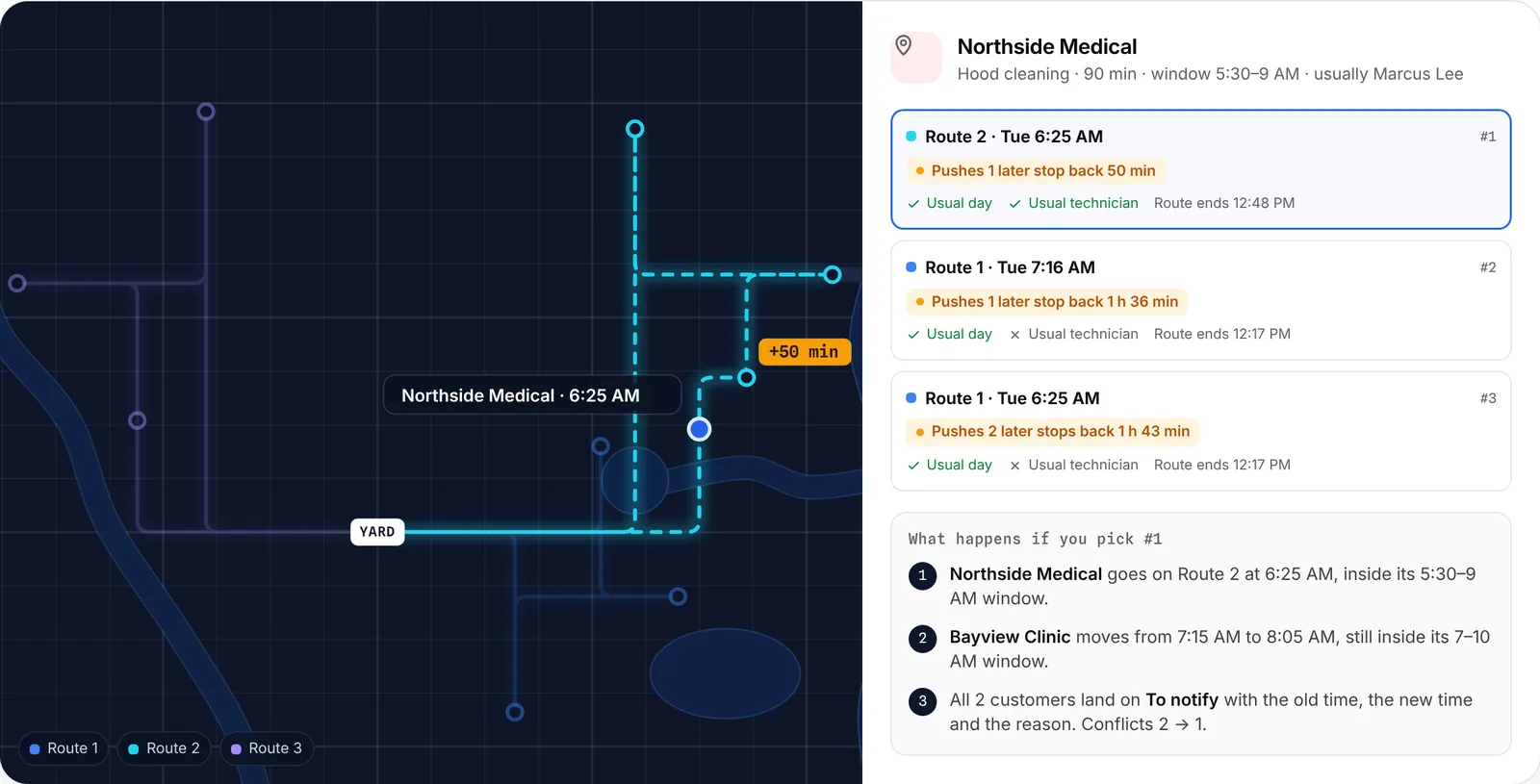
- Check what each move bumps.Adding a 90-minute job to a full route pushes later stops back; make sure they stay in their windows and nobody runs past clock-out.
- Send a backup or on-call technician when several fixed stops cluster together.
- Split, don’t stack.Two technicians taking two stops each is usually better than one taking four.
Step 3: Move the flexible stops
Move each flexible stop to another day this week, inside its window and on its allowed days, so its cycle doesn’t slip. Record why it moved. If the customer has a usual technician, try to keep them.
Step 4: Tell everyone affected
Every customer whose visit moved, changed technician or got skipped should hear from you before the technician would have arrived. Use the reschedule message templates. Tell the technicians who picked up stops, with access notes for sites they don’t usually visit.
Step 5: Make the next call-off easier
- Name a backup for every day before the week starts.
- Cross-train on the hard accounts, so more than one person knows the access notes and the equipment.
- Leave slack. A week planned to 100% has nowhere to put an extra route.
- Keep access notes on the customer, not in one technician’s head.
- Log the reason for every change, so you can see which accounts and days call-offs hit hardest.
How Crewtide helps today, and what’s coming
Today in Crewtide you add the time off and routes update after showing what changes; live checks flag stops that now fall outside their windows or past clock-out; Find a spot shows the options for each stop and what they bump; every change is logged with a reason; and each moved customer lands on the To notify list.
Coming with Pro: call-off help that shows who can cover a sick technician’s stops and what moves as a result, plus texts and emails to the affected customers.
Questions
What should a dispatcher do first when a technician calls out?
List the absent technician’s stops and sort them: fixed today, flexible this week, can skip, and needs a crew. Cover the fixed ones first.
How do you cover a call-off without overtime?
Spread fixed stops across nearby routes with room, move flexible stops to later in the week inside their windows, and keep a named backup for each day.
Should customers be told when a different technician is coming?
Yes, especially commercial accounts with access rules. A short text with the technician’s name and the same time prevents problems at the door.
Can Crewtide suggest who covers a call-off?
Today Crewtide shows the options for each stop and what they bump. Call-off help that suggests who covers what is coming with Pro.